What is Flutter? The Complete 2026 Guide to Google's Cross-Platform Framework


Table of Contents
Flutter is an open-source framework created by Google for building native iOS, Android, web, and desktop applications from a single codebase written in Dart. In 2026 it is no longer a bet: with 1.5 million monthly active developers and a spot as the second most-used mobile SDK on both Google Play and the App Store (per Google I/O 2026), Flutter has become the default choice when a company wants an app in both stores without paying for two teams.
In this guide I’ll explain exactly what it is, how it works under the hood, what changed in the latest releases, and when you should pick it (and when you shouldn’t) over React Native or Kotlin Multiplatform.
What is Flutter?
Flutter is a UI toolkit created by Google and released in 2017. Its promise is simple: you write your application once, in the Dart language, and compile it to native code for iOS, Android, web, Windows, macOS, and Linux — even for embedded devices like car displays or home appliances.
Unlike a packaged website (the old WebView-based hybrid apps), a Flutter app compiles to machine code (AOT, ahead-of-time compilation) and draws its interface with its own graphics engine. The result looks and feels like a native app, with animations running at 60/120 fps.
Flutter Logo
How does Flutter work?
The key to understanding Flutter is that it doesn’t use each platform’s native components. Instead of translating your interface into iOS or Android buttons, Flutter ships its own widgets: everything you see on screen (a button, a text, a padding, the entire screen) is a widget that Flutter paints pixel by pixel.
That gives it two superpowers:
- Total consistency: the app looks identical on an iPhone, a Galaxy, or a browser, with no surprises tied to OS versions.
- Customization without fighting the platform: if your designer wants a component that doesn’t exist on iOS or Android, in Flutter you simply draw it.
The drawing is handled by Impeller, the rendering engine Google wrote from scratch to take advantage of Metal (iOS) and Vulkan (Android). Since 2025 Impeller has been the default engine on both platforms, and with Flutter 3.44, Skia — the historical engine — was removed from Android builds entirely. In practice this killed Flutter’s most famous problem: first-run stutters caused by shader compilation jank.
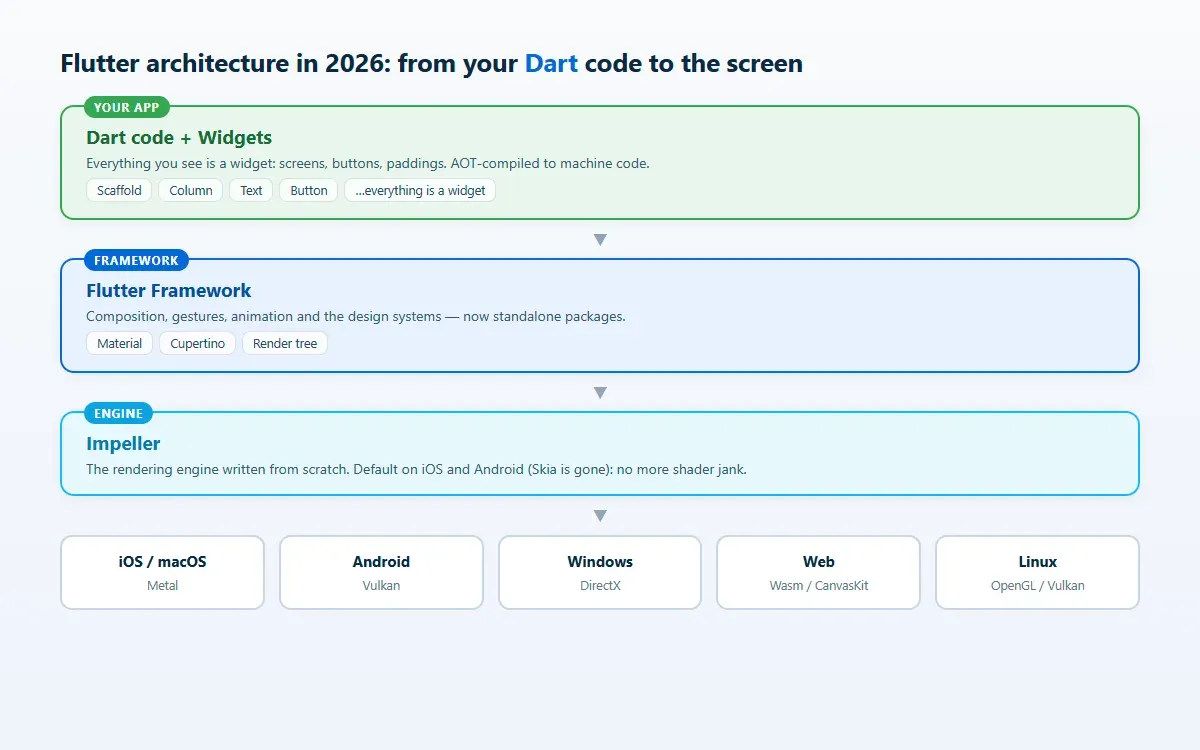
Flutter’s architecture in 2026: your Dart code and widgets on top, the Impeller engine drawing below on each platform’s graphics API
During development, Dart also compiles JIT (just-in-time), which enables the everyday star feature: hot reload, which applies your code changes to the running app in under a second, without restarting it or losing state.
What’s new in Flutter in 2026
If you read about Flutter a few years ago, this is what changed and what’s worth having on your radar:
- Flutter 3.44 and Dart 3.12 (Google I/O, May 2026) is the current stable release, following 3.38 and 3.41 in 2025. The team has committed to at least four stable releases per year.
- Material and Cupertino are leaving the core: both design systems are moving into standalone packages so they can evolve (and adopt Google’s and Apple’s redesigns) without waiting for an SDK release.
- Impeller is complete: default engine on iOS and Android, with Skia gone from Android.
- Web on WebAssembly: Wasm compilation (with WasmGC) is the path the roadmap is pushing as the future default for Flutter Web, with significant startup and performance gains over JavaScript.
- AI inside the workflow: Google introduced GenUI (interfaces generated dynamically by AI models inside Flutter apps) and agentic tooling like hot reload orchestrated by coding agents. If that world interests you, I wrote a complete guide to agentic AI and AI agents.
- Full-stack Dart: Cloud Functions for Firebase can be written in Dart, moving closer to the dream of a single language for app and backend.
- Ecosystem: pub.dev (the package repository) surpassed 1.3 billion monthly downloads.
Flutter vs React Native vs Kotlin Multiplatform
The real question in 2026 isn’t “what is Flutter?” but “why Flutter instead of something else?”. This is the honest picture:
| Flutter | React Native | Kotlin Multiplatform | |
|---|---|---|---|
| Language | Dart | JavaScript / TypeScript | Kotlin |
| UI | Own widgets (draws everything) | Native components | Native per platform or Compose Multiplatform |
| Performance | Native (AOT + Impeller) | Very good with the New Architecture | Native |
| Platforms | Mobile, web, desktop, embedded | Mobile (web/desktop via third parties) | Mobile, desktop, web in progress |
| Strong point | Visual consistency and development speed | Leveraging JavaScript teams and ecosystem | Sharing logic while keeping 100% native UI |
| Backed by | Meta | JetBrains + Google |
My criteria after years of building apps for clients:
- Pick Flutter if you want an app with a custom design, identical in both stores, built by a single team on a contained budget. It’s the sweet spot for most business apps, SMBs, and MVPs that need to scale.
- Pick React Native if your team already lives in JavaScript/React and you want to reuse that knowledge (and possibly web code).
- Pick Kotlin Multiplatform if native UI fidelity is non-negotiable and what you want to share is business logic, not pixels.
Flutter’s advantages (and its limits)
The reasons Flutter wins projects:
- One codebase, six platforms — the savings in time and maintenance are real: a fix is made once.
- Hot reload — iterating on the UI in seconds changes the dynamic with designers and clients.
- Native performance — AOT compilation + Impeller; no JavaScript bridges at runtime.
- Fully customizable UI — the widget catalog is huge and everything can be composed or drawn to spec.
- Mature ecosystem — first-class Firebase support, thousands of packages on pub.dev, and a huge community.
And the limits that deserve to be said out loud:
- Binary size: a minimal Flutter app weighs more than its native equivalent (it carries the rendering engine).
- Flutter Web is not for content sites: for a public website that needs to rank on Google, a web framework (like Astro, which powers this blog) is still better. Flutter Web shines in applications (dashboards, internal tools), not pages.
- Dart is one more language: excellent and easy to pick up coming from JavaScript or Java, but it’s a curve your team has to climb.
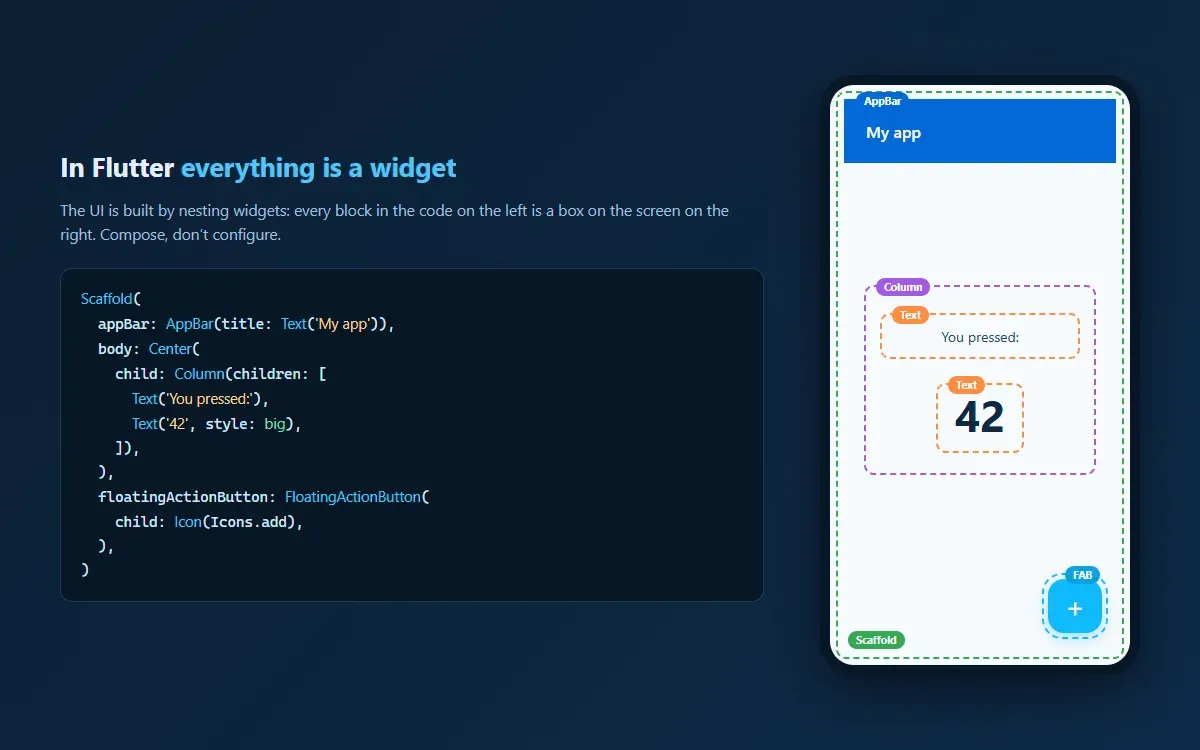
In Flutter everything is a widget: every block of code becomes a composable box on the screen
How to get started with Flutter
Getting up and running takes minutes:
- Install the SDK from flutter.dev (Windows, macOS, or Linux) and run
flutter doctorto check nothing is missing. - Set up your editor: VS Code or Android Studio with the Flutter and Dart plugins. Both include emulators, debugging, and integrated hot reload.
- Create your first project:
flutter create my_first_app
cd my_first_app
flutter run
- Touch the code: open
lib/main.dart, change a text or a color, save, and watch hot reload do its magic. - Learn the widget tree: the initial curve is understanding that the UI is composed by nesting widgets (
Scaffold→Column→Text). The official codelab is an excellent first step.
As the app grows, you’ll need to choose state management (Riverpod and Bloc are the de facto standards) and set up CI/CD for store releases. And before shipping, don’t skip security in mobile app development.
Frequently asked questions
Is Flutter free?
Yes. Flutter and Dart are open-source projects (BSD license) and cost nothing, even for commercial use. The costs of shipping your app are the usual ones: the Google Play developer account (one-time fee) and Apple’s (annual).
Do I need to know Dart to use Flutter?
Yes, but the barrier is low. Dart was designed to feel familiar to anyone coming from JavaScript, TypeScript, Java, or C#: static typing, async/await, classes. Most developers are productive within a week or two.
Does Flutter work for web and desktop?
Yes: web, Windows, macOS, and Linux are stable targets. The nuance is the use case — Flutter Web is ideal for applications (admin panels, SaaS tools), but content sites that depend on SEO are better served by a traditional web framework.
Flutter or React Native in 2026?
Both are mature and running in production in huge apps. Flutter tends to win when visual consistency, graphics performance, and covering many platforms matter most; React Native when the team already masters React and wants to share talent between web and mobile. For a greenfield project with no existing team, Flutter is today’s most frequent recommendation — and mine.
Does Flutter have a future? Is Google maintaining it?
All the evidence in 2026 says yes: a new major version at every I/O, a public commitment to four stable releases per year, 1.5 million monthly active developers, and Google using it in its own products (Google Pay, Classroom, and Gemini include Flutter surfaces). Alongside React Native, it’s the safest cross-platform bet on the market.
Conclusion
Flutter went from promise to standard: in 2026 it’s the most efficient way to ship a native-quality app on iOS, Android, and beyond with a single team. Its Impeller engine closed the performance gap, the ecosystem is huge, and Google is pushing it hard into the era of AI-generated interfaces.
Evaluating an app for your business and not sure Flutter is the way? Tell me about your project — I build cross-platform apps and can help you choose the right technology before writing a single line.
Found it useful? Get the next one by email
Once a week: what breaks when you upgrade, AI for developers and what I'm building, with sources. No spam.
By subscribing you accept our privacy policy.