Zed vs PhpStorm for PHP: Can the Fastest Editor Beat the Most Complete IDE? (2026)

Table of Contents
Zed is the editor everyone is talking about in 2026: written in Rust, GPU-rendered, free, and with the most deeply integrated agentic AI on the market. PhpStorm is the IDE that has been the professional PHP standard for fifteen years. Can the new sprinter dethrone the champion? Short answer: for PHP, not yet — but the fight is far more interesting than it looks, and for some profiles Zed is already the better pick.
Let’s put them head to head: performance, price, PHP and Laravel support, debugging, and AI. If your real question is about VS Code, I cover that separately in PhpStorm vs VS Code for PHP. And for the full landscape, see the best IDEs for PHP in 2026.
Quick verdict
| Your profile | Pick |
|---|---|
| You live off Laravel/Symfony and debug daily | PhpStorm |
| You need Xdebug with breakpoints, non-negotiable | PhpStorm (Zed can’t debug PHP yet) |
| Your workflow revolves around AI agents (Claude Code, etc.) | Zed |
| Modest machine or allergy to heavy IDEs | Zed |
| Zero budget without sacrificing speed | Zed |
| Deep refactoring and static analysis with zero setup | PhpStorm |
| You edit PHP quickly but your serious work is in another stack | Zed |
What is Zed (and why all the noise)
Zed was created by the original authors of Atom and Tree-sitter, and in April 2026 it reached version 1.0. Three things explain the hype:
- Absurd speed. It’s written in Rust and draws its UI directly on the GPU. It opens large projects instantly, scrolling runs at 120 fps, and memory usage is a fraction of a JetBrains IDE’s. Since late 2025 it also runs on Windows with full parity (DirectX 11 backend), so the “it’s Mac-only” excuse no longer applies.
- Native agentic AI, not bolted on. Zed didn’t add a chat panel to an old editor: agentic editing is built into the core. It ships Zeta2, its open edit-prediction model, and the Agent Client Protocol (ACP), an open protocol for plugging in external agents — Claude Code or Gemini CLI working inside the editor, seeing what you see.
- Built-in collaboration. Channels let you co-edit live with your team without plugins or screen sharing.
All of this free and open source. Sounds like a landslide… until we talk specifically about PHP.
Zed with PHP: the good parts and the elephant in the room
PHP support in Zed comes through the official extension and relies on two language servers you already know:
- Intelephense — autocompletion, diagnostics, go to definition. The same engine half the world uses in VS Code.
- Phpactor — heavier refactoring and introspection.
With that, the day-to-day of writing PHP in Zed is surprisingly good: solid completions, flawless syntax thanks to Tree-sitter, and a fluidity PhpStorm can only dream of. Setup takes two minutes:
// Zed settings.json
{
  "languages": {
    "PHP": {
      "language_servers": ["intelephense", "!phpactor"],
      "format_on_save": "on"
    }
  }
}
Now the elephant: Zed still can’t debug PHP. Its debugger (new in 1.0) is built on the Debug Adapter Protocol and works great with other languages, but the PHP/Xdebug adapter isn’t wired up yet — Zed’s own PHP page acknowledges it. If your workflow depends on breakpoints on a Laravel request, this is a dealbreaker today. Add to that what an IDE ships and an editor doesn’t: no database client, no HTTP client, and refactoring that stops where Phpactor stops.
PhpStorm: the champion keeps training
PhpStorm is hardly standing still:
- Everything out of the box: deep autocompletion, static analysis, a database client, an HTTP client, Git, and Xdebug preconfigured — set the breakpoint and it just works.
- The best Laravel support on the market: what used to require the paid Laravel Idea plugin became free in July 2025 and ships integrated since PhpStorm 2025.3: routes, views,
config(), Eloquent — all autocompleted. - Real refactoring: renaming a class or changing a signature propagates safely across the whole project. Neither Zed nor VS Code plays in this league.
- Junie, JetBrains’ AI agent, operates with the fully indexed project as context.
The costs: an individual license is $100 the first year, $87 the second, and $65 from the third on ($200/user/year for businesses; free for students and open source). And the weight: PhpStorm indexes everything and wants RAM — 8 GB is the comfortable minimum, 16 GB ideal. In startup time and raw fluidity, Zed humiliates it; in what it does after starting up, it’s the other way around.
Head-to-head comparison
| Criterion | Zed | PhpStorm |
|---|---|---|
| Price | Free, open source | $100/year individual ($65 from year 3); $200 business |
| Speed / RAM | Exceptional (Rust + GPU) | Heavy; 8–16 GB recommended |
| PHP autocompletion | Very good (Intelephense) | Excellent, native |
| Debugging (Xdebug) | ❌ Not available for PHP yet | ✅ Preconfigured |
| Refactoring | Basic (Phpactor) | Best on the market |
| Laravel/Symfony | Generic (LSP) | Excellent, built in |
| Database / HTTP client | No | Yes, integrated |
| AI (2026) | Native agentic: Zeta2 + ACP (Claude Code, etc.) | Junie + AI Assistant |
| Live collaboration | Built-in channels | Code With Me |
| Platforms | macOS, Linux, Windows (since 2025) | macOS, Linux, Windows |
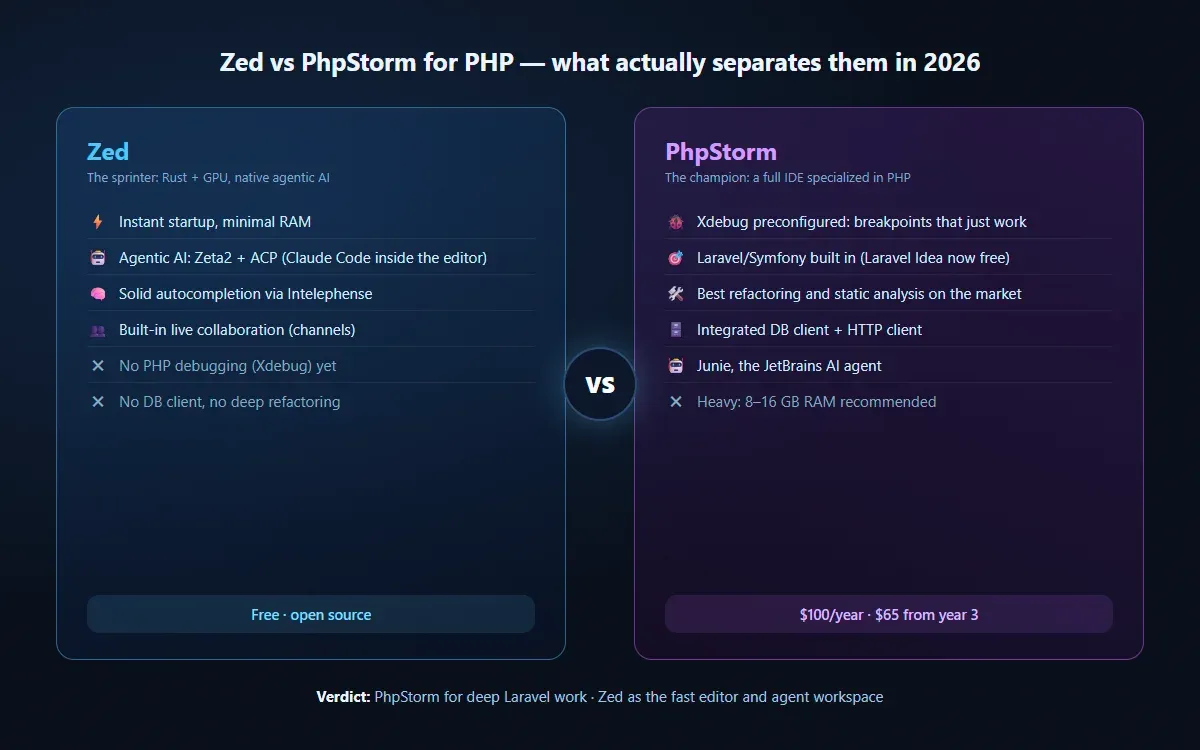
The full picture: each one wins on its own turf — Zed’s problem is the debugging row
AI: the ground where Zed leads
Here the comparison flips. PhpStorm has good AI (Junie understands the indexed project and handles multi-file tasks), but Zed is built around AI:
- Edit prediction with Zeta2 is instant and free.
- Agent mode lets an agent propose and apply edits while you review clear diffs, without leaving the editor.
- The ACP is the masterstroke: instead of marrying the vendor’s AI, you plug in whichever agent you want. If you already use Claude Code or Gemini CLI in the terminal, in Zed they work integrated into the editor.
If your way of programming is already “I supervise, the agent types,” Zed is the best environment for that flow today — and not just for PHP. I wrote more about this paradigm shift in my guide to agentic AI and AI agents.
My honest recommendation: it’s not either/or
I’ve used PhpStorm for serious Laravel work for years and I’m not letting it go while Zed can’t debug PHP: breakpoints on a real request, the database client, and safe refactoring save me hours every week.
But Zed earned a spot in my dock: for opening a project quickly, reviewing a PR, editing configs, or working with an AI agent on scoped changes, it is objectively the better tool. The combo of PhpStorm for the deep session + Zed for everything else is more common than either vendor would like to admit.
If you can only keep one and PHP is your profession: PhpStorm. If PHP is one part of your day, your machine struggles, or your workflow is already agentic: Zed, knowing what you’re giving up.
To keep tuning your environment:
- PhpStorm vs VS Code for PHP — the other duel, with step-by-step setup.
- The best IDEs for PHP in 2026 — the full landscape.
- How to install PHP on Windows — the first step before any editor.
Found it useful? Get the next one by email
Once a week: what breaks when you upgrade, AI for developers and what I'm building, with sources. No spam.
By subscribing you accept our privacy policy.