Astro.js in 2026: Complete Guide to Performance and SEO


Table of Contents
Introduction
In the dynamic world of web development, Astro.js has emerged as an innovative tool that is capturing the attention of developers and companies alike. This modern build framework is designed to improve performance and optimize the end-user experience, while offering unprecedented flexibility in building static websites.
What is Astro.js?

Astro.js is a server-first web framework that lets developers build ultra-fast websites by shipping zero JavaScript by default. What makes Astro unique is its island architecture: it renders static HTML at build time or on the server and only hydrates the interactive pieces that actually need it. This translates into faster load times and better SEO optimization.
Astro supports both static site generation (SSG) and on-demand rendering (SSR) via official adapters (@astrojs/node, @astrojs/vercel, @astrojs/netlify, @astrojs/cloudflare). The current stable version is Astro 7, which runs on Vite 8 with the Rolldown bundler (noticeably faster builds and lower memory usage) and keeps the APIs consolidated in Astro 5 and 6 stable.
Why is Astro.js growing in popularity?
Astro.js’s growing popularity stems from its ability to seamlessly integrate multiple JavaScript frameworks — React, Preact, Vue, Svelte, SolidJS, Lit, and Alpine.js — without compromising site performance. Astro lets developers use these frameworks only where needed and, thanks to client:* directives, control when and how each component is hydrated, optimizing overall performance and ensuring an optimal user experience.
Astro.js is not only becoming the preferred choice for new projects, but it is also a viable solution for re-engineering existing websites with the goal of improving their performance and SEO. With its innovative architecture and rapidly growing developer community, Astro.js is positioning itself as an essential tool in any modern web developer’s toolkit.
In short, Astro.js offers a unique combination of efficiency, flexibility, and performance optimization, making its adoption a smart strategic decision for developers and companies focused on maximizing their online presence.
Core Features of Astro.js
Astro.js stands out in the web development landscape thanks to its set of unique features that make building optimized, high-performance websites easier. These features not only improve development efficiency but also deliver an exceptional user experience.
Server-First Architecture (SSG + SSR)
One of Astro’s most significant features is its ability to pre-render at build time (SSG) or render on demand on the server (SSR) on a per-page basis using export const prerender = true | false. This approach sends ready-made HTML to the client instead of a JavaScript bundle that runs in the browser to build the page, resulting in faster load times and a better user experience from the very first interaction. It is especially critical for improving search engine visibility, as crawlers can index content more efficiently.
Multi-Framework Integration
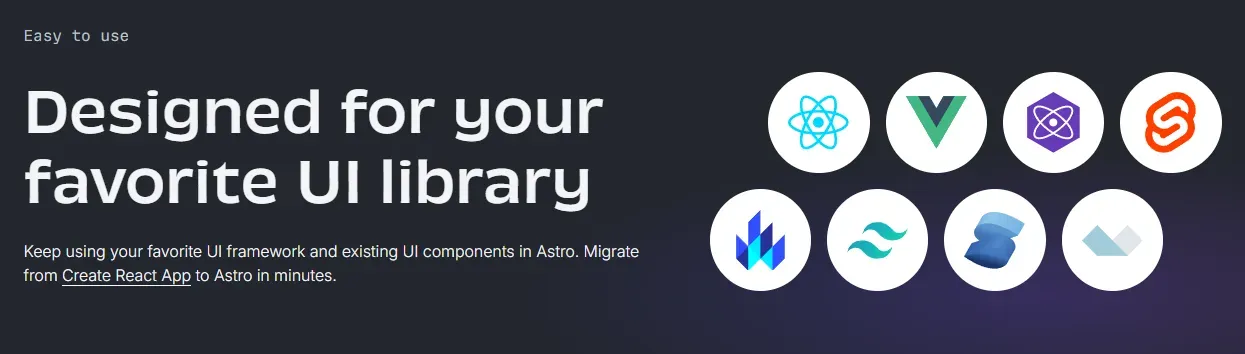
Astro.js is not limited to a single framework or library; instead, it offers official integrations for React, Preact, Vue, Svelte, SolidJS, Lit, and Alpine.js. This versatility lets developers use components from these frameworks directly within Astro projects, enabling a smooth transition for teams accustomed to working with a specific technology.
What truly sets it apart is that the client:* directives (client:load, client:idle, client:visible, client:media, client:only) tell the runtime when and under what condition to hydrate each component. This turns every interactive component into an independent “island,” rather than shipping a single monolithic JavaScript bundle to the browser as a traditional SPA does.
Compatible Frameworks
First-Class TypeScript Support
Astro offers full TypeScript support with no additional configuration: the astro check command performs type checking across .astro, .ts, and .tsx files. Since Astro 5, it also includes astro:env, a module that validates and types your environment variables at build time (schema, context: "server" | "client", access: "secret" | "public"), preventing a secret from accidentally ending up in the browser bundle.
If you want to brush up on TypeScript before leveraging it here, I recommend my introduction to TypeScript.
These Astro features not only enable faster and more efficient development, but also open new possibilities for optimizing websites for better initial load, interactivity, and accessibility. By combining SSR/SSG, multi-framework support, and selective hydration, Astro establishes itself as a powerful and flexible tool for contemporary web development.
Advantages of Using Astro.js
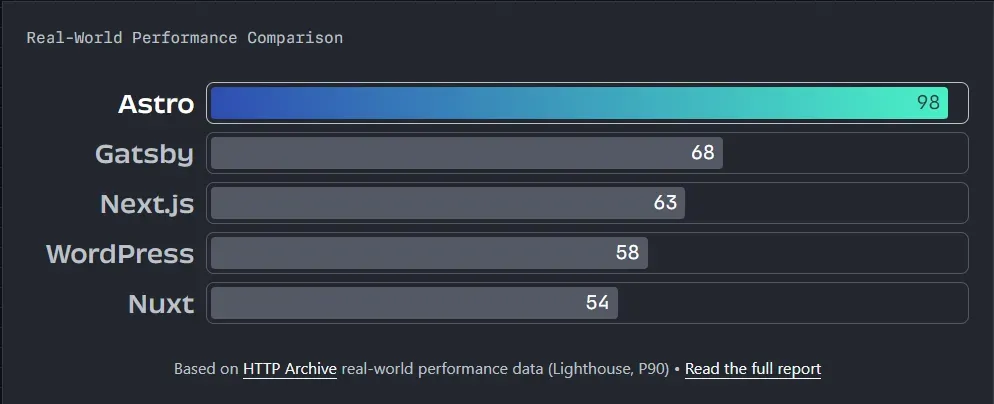
Astro.js offers multiple benefits that make it an attractive choice for developers and companies looking to build modern, efficient websites. These advantages not only improve the developer experience but also optimize overall website performance.
Improved Website Performance
One of the most significant benefits of using Astro.js is the remarkable improvement in website performance. By focusing on delivering static HTML to the client and loading JavaScript only when necessary, Astro.js significantly reduces page load times. This efficiency is crucial for retaining users, especially in a digital world where user patience is limited and load speed can determine a website’s success or failure.
SEO Optimization
Astro.js is designed with a strong focus on SEO optimization. Thanks to server-side rendering, sites built with Astro.js are extremely search-engine friendly. SSR ensures that content is available to search engines as soon as they arrive at the page, enabling faster and more effective indexing. This feature is particularly valuable in a competitive environment where search result rankings can significantly impact a site’s visibility.
Reduced Client Browser Load
Astro.js minimizes the amount of JavaScript sent to the client browser, which not only improves load speed but also reduces the resource usage on the user’s device. This is especially beneficial for users with less powerful devices or slow internet connections. By reducing the browser load, Astro.js provides a smoother and more accessible user experience, regardless of the user’s hardware or internet connection speed.
Ease of Use and Flexibility
Despite its advanced technical focus, Astro.js is easy to use and offers great flexibility in project management. It supports several popular frameworks and libraries, letting developers work with the tools they are already familiar with, within an environment that automatically optimizes site performance. Additionally, Astro.js comes with a set of templates and predefined configurations that make it easy to start new projects, reducing development time and simplifying the deployment process.
Taken together, these advantages make Astro.js an ideal solution for developers looking to create high-quality websites with outstanding performance and excellent SEO optimization. Astro.js not only solves many of the technical challenges associated with modern web development, but also provides robust tools to ensure end-user satisfaction and retention.
Getting Started with Astro.js
Astro.js is an accessible and powerful tool for developing modern websites. Here I’ll walk you through how to get started with Astro.js, from the initial setup to creating your first project.
Prerequisites and Environment Setup
Before diving into Astro.js, it’s important to make sure your development environment is properly configured. Prerequisites include:
- Node.js: Astro 7 requires Node.js 22.12+ or 24+. I recommend always working with a recent LTS version.
- NPM, pnpm, or Yarn: any modern package manager works for installing Astro and its dependencies.
To start a new project, use the official command (which succeeds the old npm init astro):
# npm
npm create astro@latest

# pnpm
pnpm create astro@latest

# yarn
yarn create astro
This command will guide you through an interactive setup process that lets you select predefined templates (blog, portfolio, minimal, etc.), the TypeScript strictness level, and whether to automatically initialize Git and install dependencies.
Creating Your First Astro.js Project
Once the environment is configured, the next step is to create your first project. The Astro setup wizard lets you choose from several templates that can include pre-built configurations for blog sites, portfolios, e-commerce applications, and more. Here are the basic steps:
-
Select a Template: Choose a template that fits the type of project you want to build.
-
Customize the Configuration: Configure aspects like the CSS preprocessor and TypeScript options if needed.
-
Local Development: Start the development server with:
npm run devThis lets you see your site live in a browser as you develop.
Basic Code Examples and Explanations
To help you get started, here is a basic example of how to structure a page in Astro:
---
// src/pages/index.astro
import Layout from '../layouts/Layout.astro';
import Counter from '../components/Counter.jsx';
const title = 'My first Astro project';
---
<Layout pageTitle={title}>
  <h1>{title}</h1>
  <p>This renders as static HTML, with no JS on the client.</p>

  <!-- React component hydrated only when it enters the viewport -->
  <Counter client:visible />
</Layout>
This code demonstrates how Astro lets you integrate components from other frameworks (in this case, a React component in a .jsx file) inside your page. The <h1> and <p> travel as pure HTML; the <Counter> only downloads and hydrates its JavaScript when the user sees it, thanks to client:visible.
Useful Tips for Beginners
- Explore the Documentation: The Astro documentation is an excellent resource for learning more about the framework’s capabilities.
- Join the Community: Participate in the Astro community on platforms like GitHub or Discord to get help and share your experiences.
- Practice with Small Projects: Start with small projects to get comfortable with Astro before moving on to more complex ones.
Starting with Astro.js may seem challenging at first, but once you get familiar with its approach and tools, you’ll discover how powerful and flexible it can be for modern web development.
Developing a Simple Project with Astro.js
Astro.js makes it easy to build efficient, modern web projects. Here I’ll walk you through developing a simple project with Astro.js, covering directory structure, style integration, and component usage.
Directory Structure and Important Files
Once you have created your Astro project, you’ll find a typical directory structure that includes the following folders and files:
src/: Contains all your components, pages, and data.components/: Reusable components are stored here.pages/: Contains your site’s pages — each file here becomes a route on your site.
public/: Stores static files such as images, fonts, and global style files.astro.config.mjs: The main configuration file for your Astro project, where you can adjust the framework settings.package.json: Defines the project’s dependencies and scripts.
Style Integration and CSS Preprocessors
Astro has built-in support for Sass, SCSS, Less, and Stylus: just install the preprocessor package (e.g. npm install -D sass) and Vite, Astro’s internal bundler, processes them automatically without any additional configuration.
For global styles, the right approach is to create the file in src/styles/ (not in public/) and import it from a layout so Vite can process, minify, and add a cache hash to it:
---
// src/layouts/Layout.astro
import '../styles/global.css';
---
The public/ folder is reserved exclusively for unprocessed static assets (favicons, robots.txt, manifest, fonts that are already optimized).
For component-scoped styles, use the <style> tag inside the .astro file. Astro applies automatic per-component scoping — no class name collisions, no additional runtime:
---
const { title } = Astro.props;
---
<h1>{title}</h1>

<style>
  h1 { color: oklch(0.7 0.2 180); font-size: 2rem; }
</style>
If you prefer utilities over hand-written CSS, Tailwind CSS 4 integrates via the Vite plugin (@tailwindcss/vite) and no longer needs a tailwind.config.js file — all configuration lives in CSS with @theme.
Using Dynamic and Static Components
Astro lets you use both dynamic and static components within your projects. Here are some key points:
- Static Components: Pre-rendered on the server and delivered as static HTML. Ideal for content that doesn’t change frequently and where performance is critical.
- Dynamic Components: Loaded dynamically on the client as needed. Useful for interactive content or content that depends on user data.
Here is an example of how to integrate an interactive component in Astro:
---
import ReactComponent from '../components/ReactComponent.jsx';
---
<html>
<body>
  <h1>Example page</h1>
  <ReactComponent client:load />
</body>
</html>
In this example, the component is imported directly (the old Astro.resolve() API was removed in Astro 3) and the client:load directive tells the runtime to download and hydrate its JavaScript as soon as the page finishes loading. By changing the directive you can adjust the behavior:
client:idle— waits until the browser is idleclient:visible— waits until the component enters the viewport (great for below-the-fold components)client:media="(max-width: 768px)"— hydrates only if a media query is metclient:only="react"— renders only on the client (useful for components that depend on browser APIs)
Practical Development Tips
- Test Locally: Use Astro’s built-in development server to test your changes in real time.
- Optimize Images: Use the
public/folder to serve optimized images that improve page load performance. - Document Your Code: Keep your code well documented to make the project easier to maintain and scale.
Developing a project with Astro.js not only lets you build incredibly fast, SEO-friendly websites, but also gives you the flexibility to incorporate modern technologies and advanced development practices in an efficient and scalable way.
Key New Features in Astro 5, 6, and 7
If you’re coming from earlier versions, these are the most important stable APIs that have landed since Astro 5 and that change the way you build a project. They are all still there in Astro 7, the current release, but that doesn’t make 7 a painless upgrade. Besides adopting Vite 8 with Rolldown as the bundler (faster builds, lower memory usage), it rewrites the compiler in Rust, which no longer fixes malformed HTML and fails the build on unclosed tags; switches the compressHTML default to 'jsx', which can glue words together between inline elements; replaces remark/rehype with Sätteri for Markdown and MDX; and removes @astrojs/db along with some astro:transitions internals. What affects you and how to fix it is in the Astro 7 upgrade guide.
Server Islands with server:defer
Server Islands let you render most of the page statically (fast, cacheable) and defer only the dynamic pieces to the server, which arrive via streaming. Ideal for avatars, shopping carts, live counters, or anything personalized per user without sacrificing the CDN cache for the rest of the page.
---
import Avatar from '../components/Avatar.astro';
---
<Avatar server:defer>
  <svg slot="fallback" class="generic-avatar">...</svg>
</Avatar>
The slot="fallback" is displayed while the server island loads, eliminating layout shifts (CLS) and improving perceived LCP.
Astro Actions: end-to-end typed backend
Astro Actions are the modern replacement for manual handlers in src/pages/api/. You define the function once with a Zod schema to validate input, and Astro generates a typed client you can call from the client with autocomplete and structured errors.
// src/actions/index.ts
import { defineAction } from 'astro:actions';
import { z } from 'astro:schema';

export const server = {
  subscribe: defineAction({
    input: z.object({ email: z.string().email() }),
    handler: async ({ email }) => {
      // your subscription logic
      return { ok: true, email };
    },
  }),
};
<button id="subscribe">Subscribe</button>

<script>
  import { actions } from 'astro:actions';
  document.querySelector('#subscribe')?.addEventListener('click', async () => {
    const { data, error } = await actions.subscribe({ email: '[email protected]' });
    if (!error) console.log('Subscribed:', data.email);
  });
</script>
Content Layer API: content without limits
The Content Layer API replaces the old Content Collections configuration. Data can now come from local Markdown/MDX, JSON, a headless CMS, or any API, and is loaded through composable loaders:
// src/content.config.ts
import { defineCollection, z } from 'astro:content';
import { glob } from 'astro/loaders';

const blog = defineCollection({
  loader: glob({ pattern: '**/*.{md,mdx}', base: './src/content/blog' }),
  schema: z.object({
    title: z.string(),
    pubDate: z.coerce.date(),
    updatedDate: z.coerce.date().optional(),
  }),
});

export const collections = { blog };
<Image /> from astro:assets
The <Image /> component automatically optimizes local images: converts to WebP/AVIF, generates a responsive srcset, enforces width/height to prevent CLS, and applies loading="lazy" by default:
---
import { Image } from 'astro:assets';
import hero from '../assets/hero.jpg';
---
<Image src={hero} alt="Specific image description" widths={[400, 800, 1200]} />
View Transitions and cross-document navigation
Astro supports the browser-native View Transitions API in both SPA mode (via <ClientRouter />) and cross-document mode (without additional JS), enabling smooth transitions between pages without turning the site into a heavy SPA.
astro:env: typed environment variables
Forget untyped import.meta.env. With astro:env you define a schema and Astro validates at build time that the variables exist, separates public from secret values, and prevents a secret from ending up in the client bundle:
// astro.config.mjs
import { defineConfig, envField } from 'astro/config';

export default defineConfig({
  env: {
    schema: {
      PUBLIC_API_URL: envField.string({ context: 'client', access: 'public' }),
      STRIPE_SECRET: envField.string({ context: 'server', access: 'secret' }),
    },
  },
});
Best Practices in Astro.js
Adopting best practices in Astro.js development not only improves code quality and project efficiency, but also ensures that the final website is robust, maintainable, and high-performing. Below are some key strategies for achieving excellence in your Astro.js projects.
Code Organization and Optimization Tips
- Effective Componentization: Break your code into small, reusable components. This not only makes maintenance easier but also improves page load, since Astro loads only the necessary components.
- Proper Use of SSR and CSR: Determine when to use server-side rendering (SSR) and when client-side rendering (CSR) is appropriate to optimize both load speed and interactivity.
- Asset Optimization: Minify and optimize images, CSS, and JavaScript. Use tools like ImageOptim for images and Terser for JavaScript.
- Strategic Caching: Implement caching strategies on both the server and the client to reduce load times and decrease the load on your server.
Security and Dependency Updates
- Keep Dependencies Up to Date: Regularly update dependencies to take advantage of performance and security improvements. Use tools like Dependabot to automate this process.
- Regularly Evaluate Security Practices: Make sure your site complies with web security best practices, such as HTTPS, appropriate security headers, and input sanitization to prevent attacks like XSS and CSRF.
Debugging and Testing Strategies
- Unit and Integration Tests: Implement tests to ensure that components work correctly both individually and when interacting with other components.
- Use Debugging Tools: Take advantage of the debugging tools built into browsers, as well as framework-specific extensions for the frameworks you use in your Astro projects.
- Performance Testing: Run load and performance tests to understand how your site behaves under different usage conditions. Tools like Lighthouse can be useful for evaluating your site’s performance.
Continuous Documentation
- Document as You Develop: Maintain detailed documentation as your project evolves. This is vital for future updates and for other developers working on the project.
- Project Wiki or In-Repository Documentation: Consider creating an internal wiki or maintaining a documentation section within your code repository to facilitate access and collaboration.
By following these best practices, you will not only optimize your Astro.js projects for performance and scalability, but also create a more secure and collaborative development environment. This translates into more efficient project deliveries and a better experience for both developers and end users.
Resources and Community
Astro.js is not only powerful because of its technology, but also because of the vibrant developer community that surrounds it and the numerous resources available for learning and honing your skills with this framework. Here is how you can dive deeper into the Astro.js ecosystem and make the most of the resources available.
Where to Find Astro.js Documentation and Tutorials
- Astro’s Official Website: The first place to start is the official Astro website, where you can find the official documentation, which is comprehensive and well organized. New users can find quick-start guides there, while advanced developers can dive into more complex concepts.
- Blogs and Articles: Many developers and technology experts write regularly about Astro.js. Sites like Medium, Dev.to, and Hashnode host a large number of articles and tutorials that can provide additional insights and real code examples.
- Courses and Video Tutorials: Platforms like YouTube, Udemy, and Coursera offer courses and video tutorials that can help you visualize how to work with Astro.js and apply its concepts in practical projects.
Online Forums and Communities
- Astro’s Discord: Joining the Astro Discord channel is an excellent way to connect directly with other Astro developers, from beginners to experts. Here you can ask questions, share your work, and get help quickly.
- GitHub: The Astro GitHub page is crucial not only for accessing the source code but also for participating in discussions about issues, features, and future improvements to the framework.
- Stack Overflow: Search for or ask about specific Astro.js problems on Stack Overflow, a large developer community where you can find solutions to common problems and share your experience.
Astro.js Conferences and Events
- Local Meetups and Conferences: Stay on top of local developer meetups and technology conferences where Astro.js may be a topic. These events are fantastic opportunities to learn from experts in person and see how others are using Astro in the real world.
- Webinars and Online Workshops: Participate in webinars and online workshops organized by the Astro community or educational platforms. These events often offer in-depth sessions and are a great opportunity to network with other developers.
Contributing to the Astro.js Community
- Contribute to the Source Code: If you are interested in contributing to Astro’s development, consider participating in the source code. This can range from fixing bugs to developing new features.
- Write and Share Tutorials: Contribute to the community by creating and sharing your own tutorials or case studies. This not only helps others but also establishes your expertise in the Astro ecosystem.
By taking advantage of these resources and actively participating in the Astro.js community, you can significantly improve your development skills while contributing to the growth and improvement of this exciting technology.
Frequently Asked Questions about Astro.js
Is Astro.js only for static sites?
No. Astro started very focused on SSG, but since version 2 it also supports on-demand SSR via adapters (@astrojs/node, @astrojs/vercel, @astrojs/netlify, @astrojs/cloudflare). You can mix both approaches in the same project, deciding page by page with export const prerender = true | false.
Does Astro replace Next.js or Nuxt?
It depends on the project. Astro is the best choice for content-heavy sites (blogs, documentation, portfolios, e-commerce, marketing) where performance and SEO are the priority. For highly interactive applications like complex dashboards, Next.js or Nuxt are still more natural given their full-SPA model. If you want to compare the current landscape, read my guide to the best JavaScript frameworks.
Can I use React and Vue in the same Astro project?
Yes. Astro allows you to combine multiple framework integrations in the same project without a significant penalty, because each component only loads its framework’s runtime when it is hydrated. Even so, mixing runtimes has a cost — use it when you truly need it (for example, integrating an existing widget).
What version of Node do I need for Astro 7?
Node.js 22.12+ or 24+. I recommend always working with the most recent LTS release. In production, deploy on the same version as your development environment.
How does Astro handle SEO compared to a SPA?
Much better by default. Since Astro sends fully rendered HTML in the first response, crawlers get the content without having to execute JavaScript. That improves indexing, discovery time, and Core Web Vitals (especially LCP and CLS). A SPA relies on the crawler executing JavaScript, which doesn’t always happen fully or quickly.
Is it worth migrating an existing project to Astro?
If your project is content-heavy and you’re suffering from large bundles, slow load times, or SEO problems, then yes. Astro allows incremental migration: you can reuse existing React or Vue components as islands. If your project is a highly interactive SPA, the migration effort probably isn’t worth it.
Conclusions
Astro.js has established itself as a powerful and flexible web development framework, designed to tackle the modern challenges of web development with its innovative approach to performance optimization and user experience. Throughout this article, we have explored the features, advantages, and best practices of Astro.js, as well as how to get started and where to find useful resources.
Recap of Key Points
- Efficiency and Performance: Astro.js significantly improves website performance through server-side rendering and conditional JavaScript loading, resulting in faster load times and a better user experience.
- Flexibility and Compatibility: The ability to integrate multiple frameworks and technologies within the same project makes Astro.js an extremely versatile tool for developers of all levels.
- SEO Optimization: By serving static content and optimizing resource loading, Astro.js ensures that websites are search-engine friendly, which is crucial for achieving high online visibility.
- Community and Resources: The active community and abundant resources available make learning and working with Astro.js accessible and enriching for developers.
The Future Potential of Astro.js in Web Development
Astro.js continues to evolve and adapt to the changing needs of web development. Its focus on improving performance without sacrificing flexibility places Astro.js in a unique position to lead in the era of modern web development. As more developers and companies adopt Astro.js, we can expect to see continuous innovations that expand its capabilities and further improve its efficiency and usability.
Call to Action
If you haven’t explored Astro.js yet, I encourage you to try this framework. Start by reading the official documentation, participate in the community, and experiment with building your own project. Whether you are an individual developer or part of a large team, Astro.js has the potential to transform the way you build and manage websites, making the process more efficient and enjoyable.
Astro.js is not only a promising technology for the present, but also stands out as an essential component in the future of web development. Its growing community and the continuous development of new features ensure that Astro.js will remain a valuable and relevant tool in the years to come.
Found it useful? Get the next one by email
Once a week: what breaks when you upgrade, AI for developers and what I'm building, with sources. No spam.
By subscribing you accept our privacy policy.